GCP Professional Cloud Architect Certification - Study Notes Part 4: Hybrid Connectivity & Load Balancing
Cross-Network & Hybrid Connectivity
Cross Network Routing (Connecting Multiple VPCs Within GCP)
VPC Network Peering
- Connects two distinct VPCs with ultra-low latency and zero routing overhead.
- Not transitive
- If VPC A is peered with VPC B, and B is peered with C, VPC A cannot communicate with VPC C.
- Most cost-effective way to connect VPCs
- No creation fees, hourly management fees, or flat data processing fees.
- Data Transfer Pricing: Subject to egress fees when traffic crosses topological boundaries:
- Intra-zone (Same region, same zone): Free
- Inter-zone (Same region, different zone): ~$0.01/GiB
- Inter-region: Standard inter-region egress fees apply (~$0.02/GiB for US-to-US regions).
- Best For: Achieving maximum throughput at the lowest cost for trusted networks located within the same regions and zones.
- Cannot be used if any CIDR block overlaps
- Fix:
- Use PSC for specific service exposure
- Use a full network proxy (e.g. a Squid or Envoy proxy VM) to handle general traffic.
- Fix:
- No route export by default
- Peered VPCs do not automatically share custom (static/BGP) routes.
- Must explicitly enable Export custom routes and Import custom routes on both sides of the peering.
- Max peering limit
- Usually 25 active peering per VPC.
Network Connectivity Centre (NCC) / Hub-and-Spoke
- Designed for complex enterprise architectures connecting multiple VPCs and on-premises footprints via a centralized Hub.
- Hub: The central router or gateway that handles traffic routing, policies, and shared services.
- Spoke: Branch networks, remote offices, or VPC environments connecting to the Hub.
- Acts as a global transit hub.
- Pricing Structure:
- Hub Fee: Free to create.
- VPC Spokes: Free for standard configurations.
- Hybrid Spokes (VPN/Interconnect/Router Appliance): First 5 attached spokes are free; subsequent spokes incur a flat per hour fee.
- Data Processing: Standard inter-zone/inter-region egress rates apply between VPC spokes. Site-to-site WAN transfers utilizing Google’s backbone incur specialized geographic WAN data transfer rates.
- Best For: A global enterprise WAN hub connecting highly distributed multi-VPC and hybrid environments.
Private Service Connect (PSC)
- Used when an application in VPC A needs to expose a specific API or service to VPC B without exposing or peering the entire network.
- Provides a direct line-of-sight to a single IP address instead of broad network-to-network access.
- PSC allows a consumer VPC to access services in a producer VPC securely using internal IP addresses without setting up traditional VPC Network Peering.
- Operates on a producer-consumer framework backed by internal load balancers and Network Address Translation (NAT).
- Pricing Structure:
- Endpoint Fee: $0.01 per hour per PSC endpoint forwarding rule.
- Data Processing Fee: $0.01 per GiB for inbound and outbound data moving through the endpoint. (Accessing standard public Google APIs via PSC is free).
- Best For: Securely connecting to a specific internal service, Google managed APIs, or third party SaaS where IP address space overlaps.
- An alternative to Private Google Access (PGA) for stricter environments.
Connecting External Networks to GCP VPC
Cloud VPN (IPsec VPN)
- Connects an on-premises or peer network to a GCP VPC over the public internet using an encrypted IPsec VPN tunnel.
- HA VPN (High Availability)
- Guarantees a 99.99% uptime SLA by enforcing two active tunnels paired with dynamic BGP routing.
- Note: Classic VPN is legacy and deprecated.
- Best For: Low-to-medium bandwidth configurations, rapid deployments, disaster recovery targets, and proof-of-concept testing.
Dedicated Interconnect
- Google physically installs a private fibre optic cable running directly from an on-premises routing facility into a Google Edge Point of Presence (PoP).
- Massive, enterprise-scale bandwidth provisioned in 10 Gbps or 100 Gbps circuits.
- Traffic completely bypasses the public internet, moving across isolated, private wires.
- Best For: Large enterprises requiring ultra low latency, highly consistent throughput, and massive data migrations (e.g., daily petabyte-scale transfers to data lakes).
Partner Interconnect
- Utilized if a company’s data centre isn’t physically near a Google Edge PoP.
- Connects the on premises network to a supported third-party service provider (e.g., AT&T, Verizon) that has pre-existing physical transport links straight into Google Cloud.
- Highly flexible bandwidth tiers ranging from 50 Mbps to 50 Gbps.
- Best For: Companies that want the reliability of private circuits but don’t need a full 10 Gbps pipeline, or those looking to leverage existing ISP provider relationships.
Cross-Cloud Interconnect
- A managed interconnect designed to build direct private pipelines between Google Cloud and other public cloud ecosystems (e.g., AWS, Azure, Oracle) without using an intermediary carrier.
- Google provisions physical links straight to the competing cloud vendor’s edge location.
- Best For: High-performance, multi-cloud setups (e.g., hosting an application frontend in AWS while running backend analytics in Google Cloud with minimal egress latency).
Direct Peering
- Not GCP managed products and do not come with a Google SLA.
- BGP peering arrangements at Google’s edge, mainly used for Workspace/YouTube CDN access.
- Exchanges BGP routing profiles directly between a business network and Google’s edge network.
- Provides enterprise-grade, high-speed access to publicly reachable Google services over a private link.
- !!Does not live inside a VPC. Cannot be used to reach internal, private VM instances.
- Best For: High-volume access to Google Workspace, YouTube CDN infrastructure, and public Google Cloud APIs without routing through the public internet.
Carrier Peering
- Not GCP managed products and do not come with a Google SLA.
- BGP peering arrangements at Google’s edge, mainly used for Workspace/YouTube CDN access.
- GCP recommends Partner Interconnect over Carrier Peering for most enterprise use cases.
- Similar to Direct Peering, but designed for enterprises that do not meet Google’s stringent physical peering mandates (such as owning a registered Public ASN).
- Utilizes a partner service provider to establish a direct connection into Google’s public network edge.
- Best For: Small-to-medium businesses wanting fast, private lanes to Google Workspace and public Cloud APIs without enterprise-scale networking overhead.
| Scaled Requirement | Public Internet or Private Line? | Target Resource | Correct Cloud Architecture Choice |
|---|---|---|---|
| Low cost, quick setup, encrypted. | Public Internet | Internal VPC Resources (VMs) | Cloud VPN (HA VPN) |
| Critical 100 Gbps line, strict SLA. | Private Fibre | Internal VPC Resources (VMs) | Dedicated Interconnect |
| Low bandwidth (200 Mbps), reliable line. | Private via ISP Provider | Internal VPC Resources (VMs) | Partner Interconnect |
| Connect directly to AWS/Azure. | Managed Cloud-to-Cloud | Internal VPC Resources (VMs) | Cross-Cloud Interconnect |
| High volume, no internet, enterprise network. | Private BGP Line | Google Workspace / Public APIs | Direct Peering |
| High volume, no internet, small network. | Private via ISP Provider | Google Workspace / Public APIs | Carrier Peering |
Designing for 99.99% SLA
To achieve a 99.99% SLA on hybrid circuits:
- For HA VPN
- Deploy two tunnels from a single GCP HA VPN gateway to two separate customer gateways (on prem) using active-active configuration.
- For Interconnect
- Requires two metro areas × two circuits each = 4 circuits total (two VLAN attachments per metro). (For 99.9%, two circuits in the same metro suffice)
- !! Traffic moving over Partner or Dedicated Interconnect is unencrypted by default.
- Deploy HA VPN over Cloud Interconnect if compliance requires in transit encryption over a physical private line.
- Or use MACsec encryption (available on some Dedicated Interconnect circuits to secure traffic at Layer 2 without the performance overhead of IPsec tunnels).
- 99.99% (SLA):
- Requires 4 attachments across two distinct metropolitan areas (Edge Availability Domains) and 2 distinct Cloud Routers in each region.
- 99.9%:
- Requires 2 attachments in a single metropolitan area across 2 separate edge domains.
VLAN Attachments (Interconnect Attachments)
- A logical connection that bridges physical Cloud Interconnect (Dedicated or Partner) to VPC network.
- Acts as dedicated layer 2/3 interface for exchanging routing and data traffic.
- Required in a specific region to connect to the VPC.
- Contains: Cloud Router, VLAN ID, MTU (Maximum Transmission Unit).
- 50 Mbps–10 Gbps for Dedicated; 50 Mbps–50 Gbps for Partner.
Global & Regional Traffic Management (Load Balancing)
Major Architectural Pillars
Traffic Type
- Layer 7: Application Layer routing handling HTTP/HTTPS protocols.
- Layer 4: Transport Layer routing handling raw TCP/UDP protocols.
Proxied vs. Passthrough Architecture
- Proxy (L4 and L7 Proxy LBs)
- Terminates the incoming client connection at the load balancer, processes the request, and opens a new connection to the backend. Allows for header manipulation, path routing, and security filtering.
- The Three-Way Handshake: The client establishes a TCP connection with the Load Balancer proxy (GFE or Envoy). The proxy then opens a separate, completely independent TCP connection to the backend VM.
- Header Blindness Exception (Proxy Protocol): Because proxies change the source IP to their own internal IP, raw backends lose visibility of the client IP. To pass the original client IP/port down to a Layer 4 Proxy LB backend without inspecting HTTP headers, you must enable the PROXY protocol (Header v1).
- Passthrough (L4 Passthrough LBs)
- Delivers raw packets directly to backend VMs using the original client IP and port configuration. The backend servers are responsible for handling the TLS/TCP handshake.
- Direct Server Return (DSR): Packets bypass an intermediate proxy step. The load balancer routes the request packet to the backend VM untouched. The backend VM then responds directly back to the client, entirely bypassing the load balancer on the return trip. This maximizes throughput.
Network Service Tiers
- Premium Tier
- Routes all inbound and outbound traffic over Google’s high-performance, global fibre-optic network, on boarding traffic at the edge point closest to the client.
- Traffic enters Google’s private network closest to the user (Anycast IP).
- Standard Tier
- Handles traffic via standard commercial transit ISP networks. This tier is cheaper but introduces higher latency.
- Traffic travels over the public internet and enters Google’s network right at the destination region.
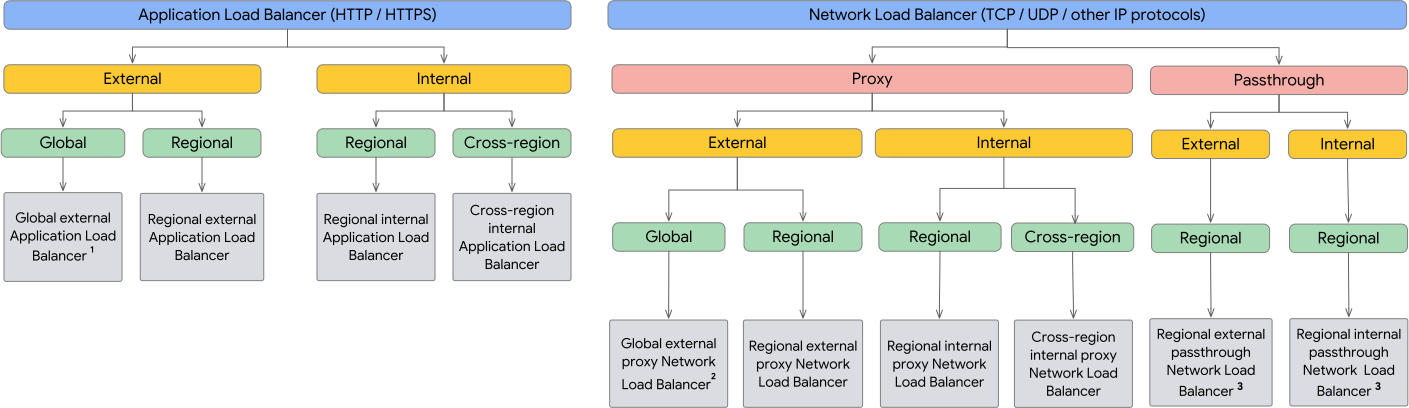
Overview
Network (L4) Load Balancers
Distribute traffic based only on IP address and ports. Can be passthrough or proxy, and external (internet facing) or internal (within network).
Application (L7) Load Balancers
Distributes HTTP and HTTPS traffic to backends hosted on GCP, as well as external backends connected over the internet or using hybrid connectivity.
How They Work Together
- Network Load Balancer (Layer 4)
- Acts as the entry point.
- Evaluates IP addresses and TCP/UDP ports to route traffic without inspecting the content.
- Offers ultra-low latency and can handle sudden bursts of traffic (millions of requests per second).
- Directs incoming traffic to the Application Load Balancer.
- Provides stable, static IP address for your infrastructure and absorbs initial connection loads.
- Application Load Balancer (Layer 7)
- Acts as the “smart router.”
- Sits behind the NLB and evaluates application level data like HTTP/HTTPS headers, paths (e.g.,
/imagesor/api), and cookies. - It terminates the SSL/TLS connection, inspects the incoming request, and routes it to the correct backend server, container, or microservice.
- Enables advanced routing, URL-based switching, SSL offloading, and sticky sessions.
Why Combine Them?
Combining both leverages the strengths of each tier:
- Massive Scale & Performance: The NLB absorbs sudden traffic surges and handles millions of requests per second without breaking a sweat.
- Intelligent Routing: The ALB handles complex logic, SSL termination, and host-based routing.
- Static IP Assignment: Cloud NLBs provide static IP addresses, which are required for DNS mapping. ALBs typically use dynamic IP addresses, so putting an NLB in front allows you to point your domain to a fixed IP.
| Load Balancer Type | Layer | Scope | Type | Proxy vs Passthrough | Key Use Case |
|---|---|---|---|---|---|
| External Application LB | L7 | Global, Cross-Region, or Regional | External | Proxy (GFE for global or Envoy for regional) | Public websites, microservices routing, Cloud CDN/Armor integration. |
| Internal Application LB | L7 | Cross-Region or Regional | Internal | Proxy (Envoy) | Internal microservices, private L7 routing within a VPC. |
| External Passthrough Network LB | L4 | Regional | External | Passthrough | Preserving original client IPs, non-TCP/UDP traffic (ESP, ICMP), ultra-high throughput. |
| Internal Passthrough Network LB | L4 | Regional (with Global Access optional) | Internal | Passthrough | Private, low-latency internal Layer 4 traffic balancing. |
| External Proxy Network LB | L4 | Global or Regional | External | Proxy (GFE for global or Envoy for regional) | Strict port proxying, raw TCP traffic with SSL termination (without HTTP header parsing). |
| Internal Proxy Network LB | L4 | Cross-Region or Regional | Internal | Proxy (Envoy) | Multi-region private TCP failover, strict port proxying inside VPC. |
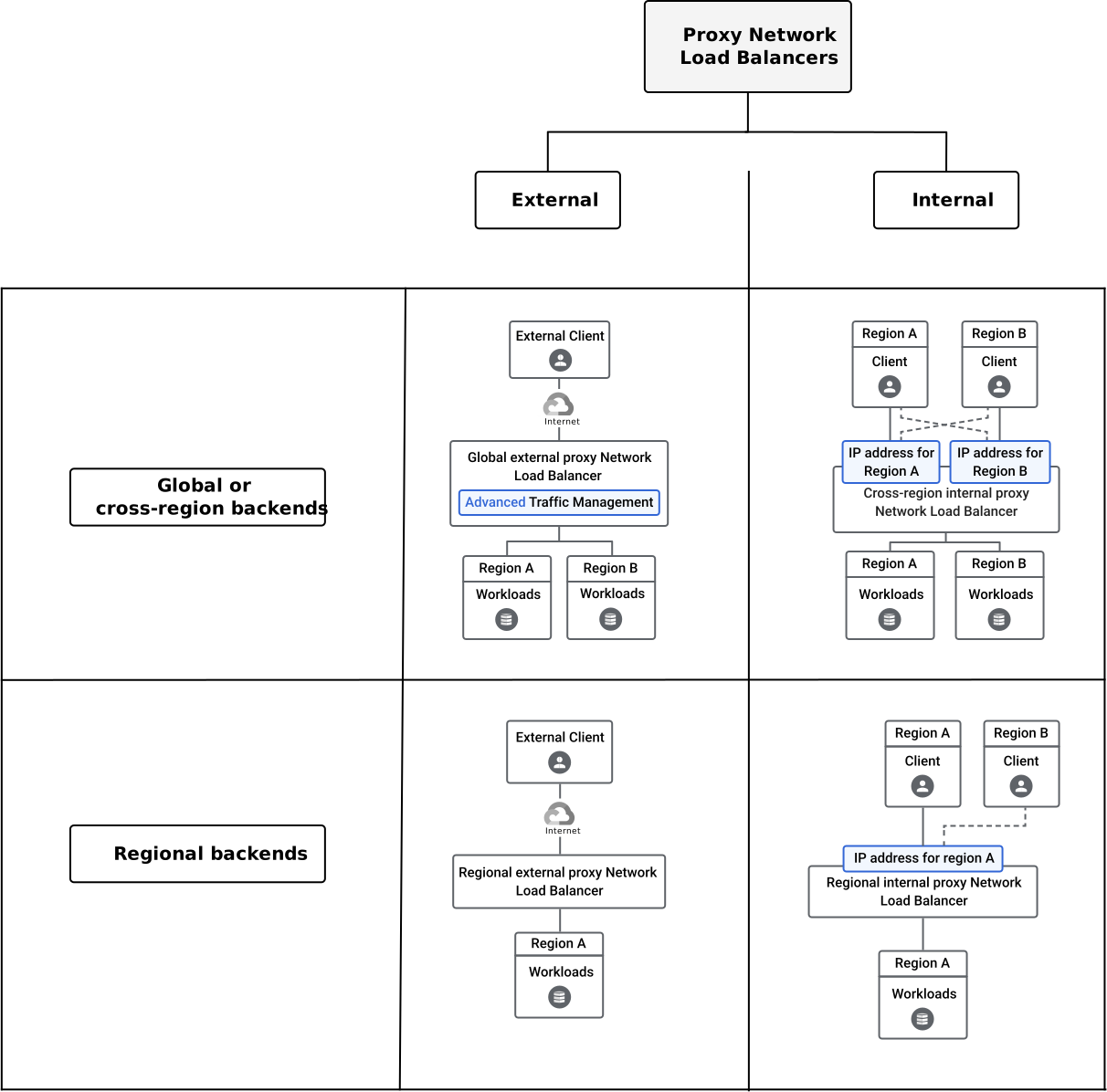
Proxy Network Load Balancers
Passthrough Network Load Balancers
Application Load Balancers

Proxy Network Load Balancers (L4)
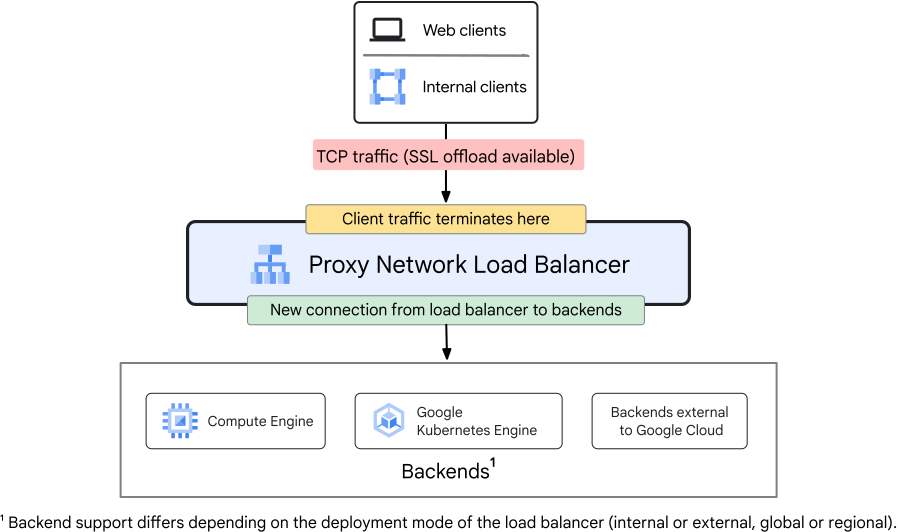
Terminate the incoming client TCP connection at the load balancer itself, then open a new, separate TCP connection to the backend. The backend never sees the original client, it only sees the load balancer’s internal IP as the source.
Proxy Network Load Balancer architecture
Variants
| Variant | Scope | Deployment | Key Trait |
|---|---|---|---|
| External Proxy Network LB (Global) | Global | External | Single global Anycast IP via GFEs |
| External Proxy Network LB (Regional) | Regional | External | Envoy-based; requires Proxy-only Subnet |
| Internal Proxy Network LB (Cross-Region) | Cross-Region | Internal | Private multi-region failover via Envoy |
| Internal Proxy Network LB (Regional) | Regional | Internal | Private single-region TCP proxying via Envoy |
How it Works
- Client establishes a TCP connection with the load balancer (not the backend directly).
- The load balancer terminates the TCP handshake, inspects the packet headers, selects a healthy backend, and opens a new, independent TCP connection to that backend.
- The backend receives traffic sourced from the load balancer’s internal IP, not the original client IP.
- !! To pass the original client IP to backends at L4 without HTTP headers, enable PROXY Protocol v1 on the backend service. The LB prepends a plain-text header to the TCP stream containing the original client IP and port.
Protocols Supported
- TCP and SSL/TLS only.
- !! Cannot handle UDP, ESP, GRE, ICMP, or other non-TCP protocols. Use a Passthrough Network LB for those.
Proxy-Only Subnet Requirement
- Regional variants (both External and Internal) require a Proxy-only Subnet in the target VPC region.
- Google allocates private IPs from this subnet to the Envoy proxy instances that terminate client connections.
- Must be at least a
/26block (64 IPs) to accommodate Envoy autoscaling. - External Proxy Network LB uses
--purpose=REGIONAL_MANAGED_PROXY. - Internal Proxy Network LB uses
--purpose=REGIONAL_MANAGED_PROXY(regional) or--purpose=GLOBAL_MANAGED_PROXY(cross-region).
- Global variant (GFE-based) does not require a Proxy-only Subnet — GFEs are managed globally by Google.
SSL/TLS Termination
- The proxy layer handles TLS termination, offloading the handshake cost from backend VMs.
- Supports SSL certificates managed by Google Certificate Manager or self-managed certificates.
- Backends receive unencrypted TCP traffic from the proxy — re-encrypt backend traffic using SSL policies if needed.
Scope & Availability
- Global External Proxy Network LB: Uses a single Anycast IP that routes users to the nearest Google Front End (GFE) edge point globally. Requires Premium Tier networking.
- Regional External Proxy Network LB: Envoy-based; traffic handled within one region. Can use Standard Tier networking.
- Cross-Region Internal Proxy Network LB: Routes private TCP traffic across multiple regions with automatic regional failover. Uses global backend services and global URL maps.
- Regional Internal Proxy Network LB: Routes private TCP traffic within a single region.
When to Use Proxy Network LB
- Strict TCP port proxying without HTTP header inspection.
- SSL/TLS offloading at the load balancer layer for TCP backends.
- Need a single global Anycast IP for a raw TCP service (not HTTP)
- Use Global External Proxy Network LB.
- Multi-region private TCP failover within a VPC
- Use Cross-Region Internal Proxy Network LB.
- !! When a question says “raw TCP traffic, global single IP, no HTTP parsing” → Global External Proxy Network LB.
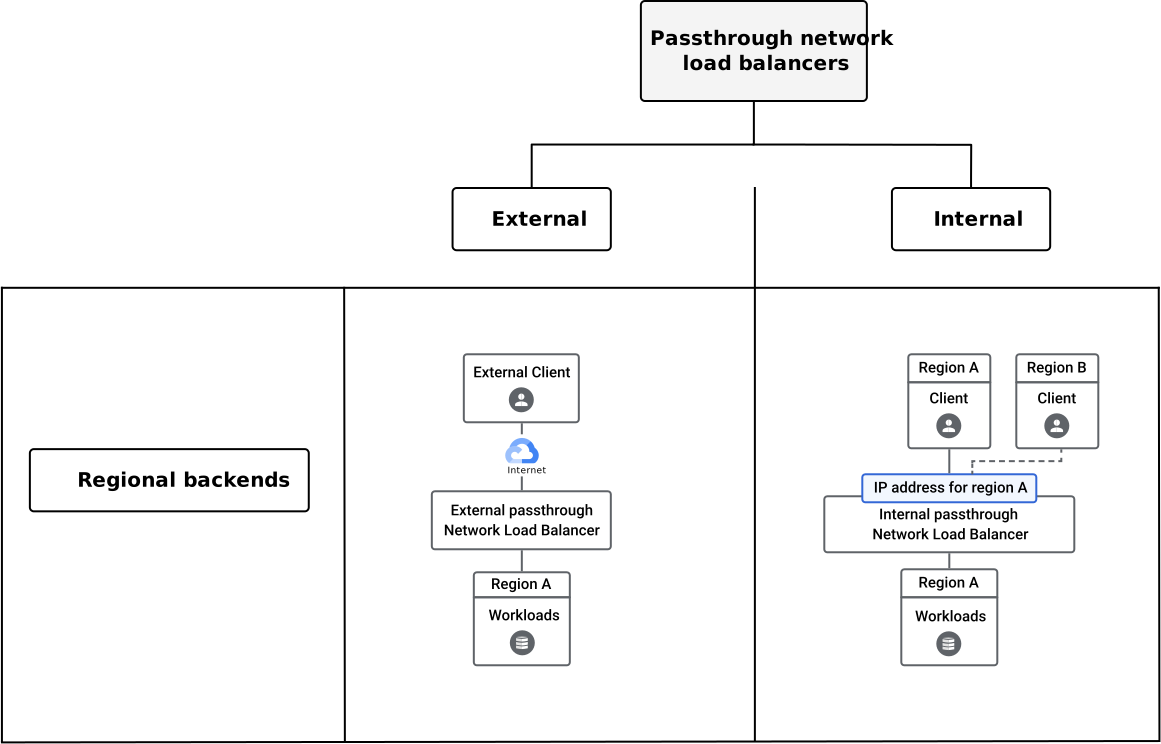
Passthrough Network Load Balancers (L4)
Deliver raw packets directly to backend VMs without terminating the client connection or modifying the packet. The backend VM handles the TCP/UDP handshake itself, and responds directly back to the client bypassing the load balancer entirely on the return trip.
Passthrough Network Load Balancer architecture
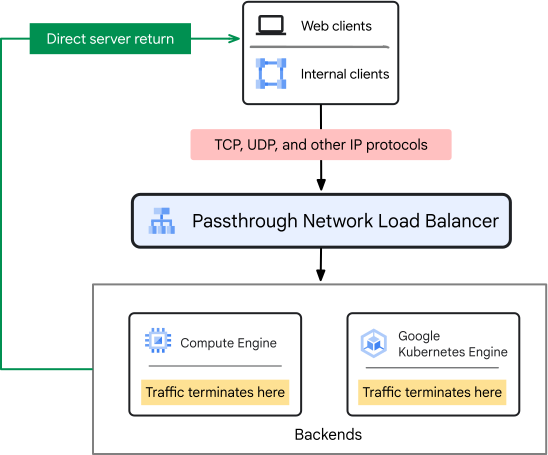
Variants
| Variant | Scope | Deployment | Key Trait |
|---|---|---|---|
| External Passthrough Network LB | Regional | External | Preserves client IP; supports non-TCP protocols |
| Internal Passthrough Network LB | Regional | Internal | Private L4 pass-through; usable as a Next Hop route |
How it Works — Direct Server Return (DSR)
- The load balancer distributes the inbound request packet to a backend VM — packet arrives at the VM with the original client source IP and port intact.
- The backend VM sends the response packet directly back to the client, completely bypassing the load balancer on the return path.
- This eliminates a full round-trip through the load balancer, maximizing raw throughput and minimizing latency.
- !! The load balancer only sees inbound traffic — it never sees response packets.
Client IP Preservation
- Because packets are never modified, backend VMs receive the original client source IP directly in the TCP/IP packet headers.
- No PROXY protocol or X-Forwarded-For header needed — the source IP is naturally preserved at the network layer.
- !! This is the exam answer whenever a question requires backends to log or inspect the raw client IP address.
Protocols Supported
- TCP, UDP, ESP, GRE, ICMP, and other IP protocols.
- !! The only load balancer that supports non-TCP/UDP traffic (e.g., ESP for IPsec VPNs, GRE tunnels, ICMP). Use External Passthrough for any non-TCP/UDP protocol balancing requirement.
Backend Service vs. Target Pool (External Passthrough Only)
External Passthrough Network Load Balancers can be configured using either a modern Backend Service or the legacy Target Pool approach. !! PCA exam highly prioritizes backend service based designs.
| Backend Service (Modern) | Target Pool (Legacy) | |
|---|---|---|
| Protocols | TCP, UDP, ESP, GRE, ICMP, tunnel protocols | TCP and UDP only |
| Backend Types | MIGs, NEGs (hybrid/on-prem), zonal NEGs | Instance Groups only (no NEGs) |
| Health Checks | Advanced HTTP/HTTPS/TCP health checks | Basic legacy health checks |
| Failover | Sophisticated failover policies | Backup Target Pool only |
| Connection Draining | Supported | Not supported |
| Recommended? | Yes — always prefer this | No — legacy only |
VPC Firewall Configuration
- Because packets are delivered directly to backend VMs with the original client IP preserved, VPC firewall rules must explicitly allow traffic from:
- The original client IP ranges (e.g.,
0.0.0.0/0for public internet traffic) to backend instances. - Google’s health check ranges:
130.211.0.0/22and35.191.0.0/16.
- The original client IP ranges (e.g.,
- !! Do NOT write firewall rules sourced from the load balancer IP — passthrough LBs do not have a proxy IP that traffic flows from. The source seen by the VM is always the original client.
Internal Passthrough Network LB as “Next Hop”
- The Internal Passthrough Network LB can be configured as the Next Hop destination in a custom static VPC route — a capability unique to passthrough architecture.
- Core Use Case — HA Virtual Firewall Appliances:
- When deploying a cluster of third-party virtual firewall appliances (e.g., Palo Alto, Fortinet, Check Point) inside a VPC, route all subnet traffic to an Internal Passthrough NLB sitting in front of the firewall cluster.
- The LB continuously monitors firewall VMs via health checks.
- If one firewall VM crashes or fails its health check, the LB automatically redirects all route traffic to the remaining healthy firewall VMs — preventing a network-wide routing blackhole with zero manual intervention.
- !! No other load balancer type can be set as a VPC route Next Hop — this is a unique architectural capability of the Internal Passthrough Network LB.
When to Use Passthrough Network LB
- Backend VMs must see the original client source IP (regulatory logging, IP-based authentication).
- Need to load balance non-TCP/UDP protocols: ESP, GRE, ICMP.
- Ultra-high throughput workloads where proxy overhead is unacceptable — DSR eliminates return-path latency.
- Deploying HA virtual network appliances (firewalls, IDS/IPS) as a routable Next Hop.
- !! When a question mentions “client IP must be visible to backend”, “ESP/ICMP/GRE protocol”, or “ultra-high throughput without proxy latency” → Passthrough Network LB.
Proxy vs. Passthrough Decision Matrix
| Proxy Network LB | Passthrough Network LB | |
|---|---|---|
| Connection model | Terminates client TCP; opens new connection to backend | Delivers raw packets directly; backend handles handshake |
| Client IP at backend | Load balancer IP (use PROXY Protocol to pass original) | Original client IP preserved natively |
| Return path | Response flows back through the load balancer | Direct Server Return — response bypasses LB entirely |
| Protocols | TCP / SSL only | TCP, UDP, ESP, GRE, ICMP, and other IP protocols |
| Throughput | Moderate — proxy adds processing overhead | Maximum — no proxy overhead |
| SSL termination | Yes — at the load balancer | No — backend VMs handle TLS themselves |
| Can be a VPC Next Hop? | No | Yes (Internal variant only) |
| Proxy-only Subnet needed? | Yes (regional variants) | No |
| Global Anycast IP? | Yes (Global External variant) | No — regional only |
| Typical use case | SSL offload, global single-IP TCP service | Client IP logging, non-TCP/UDP, virtual appliances, DSR |
External Application (L7) Load Balancers
External Application Load Balancer architecture
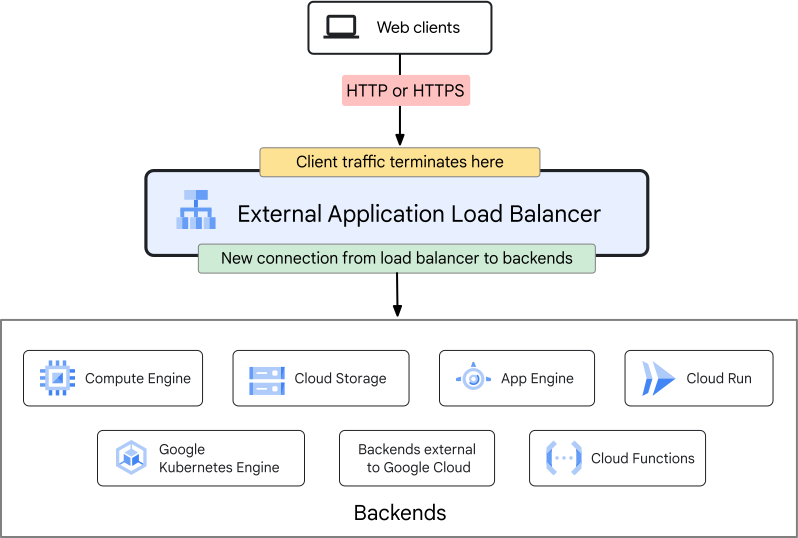
Architecture Components
- Forwarding Rule: Binds an external IP address and port to a target proxy.
- Global & Cross-Region: Uses a Global Anycast IP address.
- Regional: Uses a Regional static IP address.
- Target HTTP(s) Proxy: Terminates client SSL/TLS sessions. References a URL map.
- Global: Managed via Google Front Ends (GFEs) at edge locations.
- Cross-Region & Regional: Managed via Google orchestrated Envoy Proxies.
- Regional Requirement: Requires dedicated Proxy-Only Subnet (
Regional Managed Proxypurpose) in the target VPC region to host Envoy instances.
- URL Map: The routing engine. Matches incoming paths/hosts (e.g.
/video/*,/image/*) and forward them to correct backend service.- Note: Cross-Region and Regional (Envoy-based) variants support more complex Layer 7 traffic routing, weighted splits for canary testing, and header transformations than the standard Global (GFE) variant.
- Backend Service: Manages backends, configurations (health checks, timeouts, session affinity), and capacity metrics.
Regional external Application Load Balancer components

Key Concepts
SSL/TLS Termination
- Global & Cross-Region: Handled at the edge of Google’s global network, drastically reducing CPU overhead on your backends.
- Regional: Handled entirely within the specific target region by the Envoy proxies to comply with strict regional data sovereignty constraints.
Security & Optimization
- Cloud CDN (Edge Caching): Only supported by the Global variant. (Cross-Region and Regional deployment types cannot use Cloud CDN).
- Google Cloud Armor (WAF/DDoS): * Global: Uses Global Cloud Armor policies enforced at the edge before traffic enters the VPC.
- Cross-Region & Regional: Uses Regional Cloud Armor policies enforced directly within the designated region.
Network Tiering Requirements
- Global & Cross-Region: Must run on the Premium Tier network to utilize Google’s global private fibre backbone.
- Regional: Can run on the Standard Tier network (routing over public transit ISPs until reaching the region), making it highly cost-effective if edge optimization isn’t needed.
Backend Diversification
Can route traffic to:
- Instance Groups (MIGs/UMIGs).
- Zonal Network Endpoint Groups (NEGs) for GKE containers.
- Serverless NEGs (Cloud Run, Cloud Functions)
- Supported on Global and Regional types.
- Internet NEGs: Directs traffic to external, non-GCP endpoints over the public internet.
- Hybrid NEGs: Directs traffic to on-prem endpoints via Cloud VPN or Cloud Interconnect using private IPs.
QUIC Protocol & HTTP/3
- Replacement for TCP for faster, more secure web browsing.
- Bundles multiple streams of data into a single, encrypted connection so one slow file download does not stall your whole page.
- Fewer handshakes; excellent for optimizing mobile performance over flaky cellular networks.
- Supported across the External Application LB family.
| Architectural Vector | Global External Application LB | Cross-Region External Application LB | Regional External Application LB |
|---|---|---|---|
| Proxy Architecture | Google Front Ends (GFEs) globally | Managed Envoy proxies across regions | Managed Envoy proxies in one region |
| Network Tier Requirement | Premium Tier only | Premium Tier only | Standard Tier or Premium Tier |
| Routing Scope | Global (Anycast IP routes traffic to closest GFE) | Multi-region routing via Envoy | Single region routing only |
| Advanced Features | Cloud CDN & Cloud Armor | No Cloud CDN; Limited Cloud Armor | No Cloud CDN; Limited Cloud Armor |
| Backend Types | Instance Groups, Zonal NEGs, Serverless, Internet, Hybrid | Instance Groups, Zonal NEGs, Hybrid | Instance Groups, Zonal NEGs, Serverless, Hybrid |
| If the exam scenario states… | …Your choice must be: |
|---|---|
| Needs Cloud CDN caching or global DDoS scrubbing at the edge | Global External ALB |
| Needs advanced Layer 7 routing (e.g., traffic splitting/mirroring) across multiple regions | Cross-Region External ALB |
| Complete data residency/compliance rules dictate traffic handling and SSL termination must stay in a single country/region | Regional External ALB |
| Tight budget requirements where Standard Network Tier is preferred to minimize outbound transfer costs | Regional External ALB |
Internal Application (L7) Load Balancers
Architecture & Envoy Proxies
Unlike external load balancers that run on Google’s shared global infrastructure (GFEs), Internal Application Load Balancers are implemented using Envoy proxies deployed automatically inside a VPC network.
Envoy Proxy
- A high performance, open source edge and service proxy that serves as a universal data plane and communication bus, natively handling networking, observability, and security for distributed, cloud native microservices and service mesh architectures.
- Edge/Ingress Proxy
- Act as API gateway to handle external requests, TLS termination, and routing before traffic reaches internal services.
- Service Mesh
- Sits alongside every microservice, intercepting and managing all incoming and outgoing network traffic. Ensures consistent security, routing and telemetry.
Deployment Modes
No longer strictly regional. It has two distinct modes:
- Regional Internal Application LB:
- Scope: Both clients and backend services must reside in the same region.
- Components: Uses regional backend services, a regional URL map, and a regional target proxy.
- Cross-Region Internal Application LB:
- Scope: Used when internal microservices span multiple regions for high availability and disaster recovery.
- Failover Logic: Traffic is automatically routed to the closest healthy backend region. If that entire region goes down, traffic automatically shifts to the next closest region.
- Components: Uses global backend services, global URL maps, and global target proxies, but retains regional internal IP addresses for the forwarding rules in each target region.
Proxy Only Subnet Requirement
- Must create a Proxy-only Subnet within the VPC region where load balancer resides.
- Google Cloud use this subnet to allocate private internal IP addresses to the Envoy proxy.
- The proxies use these IPs to initiate connections to your backend instances.
- Allocate at least a
/26block (64 IP addresses) to account for autoscaling of Envoy proxies during traffic spikes.- Google reserves 4 IP addresses in every subnet, leaving 60 usable IPs for Envoy proxies.
- Regional and Cross-Region internal load balancers cannot share the same proxy subnet.
- Regional Internal ALB Subnet Purpose: Must be configured with
--purpose=REGIONAL_MANAGED_PROXY. - Cross-Region Internal ALB Subnet Purpose: Must be configured with
--purpose=GLOBAL_MANAGED_PROXY.
- Regional Internal ALB Subnet Purpose: Must be configured with
- In a single VPC region, you can have exactly one active proxy only subnet for Regional proxies, and exactly one active proxy only subnet for Cross Region proxies.
- Shared by all internal applications and internal proxy network load balancers in that region.
VPC Firewall Rules for Internal L7
Must explicitly configure two ingress firewall rules:
- From Proxy-only Subnet to Backend
- Allow Envoy proxies to deliver requests to application servers.
- From Health Check Ranges to Backend
- Allows Google Cloud’s central health check systems (
130.211.0.0/22and35.191.0.0/16) to verify backend health.
- Allows Google Cloud’s central health check systems (
Connected & Hybrid Networks
- VPC Peering
- Internal Application Load Balancers are accessible across peered VPC networks automatically.
- Hybrid Access (Cloud VPN/Interconnect)
- On prem clients can reach the internal load balancer.
- For Regional Internal
- Turning on Global Access allows client VM located in Europe to talk to internal load balancer located in US.
- However, the backend instances must still be in US.
- For Cross Region Internal
- Global Access is implicitly active.
- Clients can reach LB from any region, and backend services themselves are spread across multiple regions globally.
- If Global Access is disabled, VPN gateway/interconnect must reside in the same region as the load balancer.
Advanced Traffic Management & Shared VPCs
- Shared VPC Architecture
- Internal ALBs fully support Shared VPCs.
- Forwarding rule, IP address, and Proxy-only subnet must reside in Service Project.
- They cannot be placed in the Host Project if backend instances belong to Service Project.
- Internal ALBs fully support Shared VPCs.
- Traffic Splitting (Canary Deploys)
- Because Internal ALBs run on Envoy, they natively support weighted traffic splitting (e.g., routing 95% of internal traffic to
/v1/and 5% to/v2/of a microservice) without requiring an external Service Mesh.
- Because Internal ALBs run on Envoy, they natively support weighted traffic splitting (e.g., routing 95% of internal traffic to
| If the PCA scenario requires… | …Your choice must be: |
|---|---|
| Low latency L7 internal routing between microservices in the same VPC region | Regional Internal ALB |
| Multi-region internal failover/HA for backend services inside private networks | Cross-Region Internal ALB |
| Traffic splitting or mirroring for internal canary deployments | Any Internal ALB (via Envoy URL Maps) |
| Inter-VPC internal L7 load balancing | Peered VPCs + Internal ALB |
Session Affinity (sticky sessions)
- Load balancers distribute traffic across multiple backends, but some applications need requests from the same client to consistently land on the same backend.
- Applications using server-side sessions will break if requests bounce between different backend instances.
- Routing a client’s requests to the same backend for the duration of their session.
- e.g. shopping carts stored in server memory, WebSocket connections, file upload sessions.
| Type | Layer | How | Behaviour | Best for |
|---|---|---|---|---|
| NONE | L4/ L7 |
Standard 5 tuple hashing (Source IP, Destination IP, Source Port, Destination Port, Protocol) | No Explicit affinity. LB evaluates all incoming packet or HTTP request independently using standard hashing or round robin. | Fully stateless applications, microservices, or APIs where requests contain all necessary state. e.g. content delivery, REST APIs, microservices, or public blogs where no user data needs to be saved between clicks. |
| CLIENT_IP | L4 | 2 tuple hashing, (client / source IP address (and destination IP for most LBs)) | Every request originating from same client IP address is forwarded to same backend server, regardless of protocol or client-side ports being used. | Non-HTTP stateful protocols or media streaming where clients frequently open multiple distinct connections from same device. NOTE: if many users behind single proxy/NAT (e.g. office building), all of them will be sent to same backend, causing unbalance. |
| CLIENT_IP_PROTO | L4 | 3 tuple hashing (source IP, destination IP, and protocol) | Protocol specific routing. If client switches from TCP connection to UDP connection, LB may route traffic to a completely different backend server. However, as long as they stay on same protocol, they stick to same server. | Essential for applications handling fragmented UDP packets. Because subsequent UDP fragments do not contain port numbers, a standard 5 tuple hash will drop them, whereas CLIENT_IP_PROTO successfully groups them together. |
| CLIENT_IP_PORT_PROTO | L4 | Standard 5-tuple hashing applied strictly for session continuity (source IP, source port, protocol, destination IP, and destination port) | Affinity only for the duration of a single TCP/UDP connection. If a browser or application closes a connection and opens a new one (which randomizes the client’s source port), the affinity breaks and they may hit a different server. | Fine grained L4 affinity. For long lived, continuous TCP connections (like databases or persistent IoT streams) that require traffic to stay on one server for that specific connection’s lifespan. |
| GENERATED_COOKIE | L7 | LB automatically injects its own tracking cookie into the first HTTP response sent back to the client. | Browser automatically stores cookie and appends it to all subsequent web requests. LB reads this dedicated cookie to route user back to identical web server node. | Standard web apps that store transient session states (e.g. web shopping carts) locally in server RAM without requiring code alterations to backend application. |
| HTTP_COOKIE | L7 | Instead of creating a new cookie, LB monitors a pre-existing cookie generated natively by web framework. | LB intercepts application’s native cookie during first handshake, logs backend server mapping, and uses that exact cookie to track routing for all future incoming requests. | Best for stateful HTTP/HTTPS web applications where engineering team needs precise control over session expiration, secure cookie flags, and lifetimes handled directly inside core application code. |
| HEADER_FIELD | L7 | Use consistent hash mechanism based on specific predefined HTTP header (e.g. X-User-ID, Authorization, or a custom API key). |
LB inspects the plaintext value of that header field. Every request containing that identical header value will land on the exact same backend server, regardless of changing client IP addresses. | For mobile applications, API gateways, and microservices where clients frequently hop across wifi/cellular networks (causing IP changes), but maintain the exact same authorization token. |
Cloud CDN (Content Delivery Network)
- Cache static content (images, videos, CSS) at Google’s global Edge points of presence (PoPs) closest to users.
- Can only be toggled on directly at the backend service configuration of a Global External Application LB.
Cloud DNS
- Private DNS Zones
- Internal only domain names visible only to specific VPC networks.
- No one on the internet can scan or resolve these names.
- Outbound DNS forwarding (Forwarding Zones)
- Tells Cloud DNS that if a VM asks for an internal domain name, it should forward that query across the VPN/Interconnect line to the on prem active directory DNS server.
- Inbound DNS Forwarding (Inbound Server Policy)
- Allows on prem servers to query Cloud DNS to resolve private IPs of cloud hosted resources.
- DNS Peering
- Allow VPC to forward name resolution requests for specific private zone to another VPC network.
- Key in Hub and Spoke model, where all private DNS records are managed centrally in a Shared VPC Host project.