GCP Professional Cloud Architect Certification - Study Notes Part 6: Kubernetes Overview & GKE Ecosystem
---
title: COMPUTING ABSTRACTION LEVEL
---
%%{init: {'themeVariables': { 'fontSize': '10px' }, 'flowchart': {'nodeSpacing': 20, 'rankSpacing': 20}}}%%
flowchart
    CF["Cloud Functions (FaaS): Event-Driven Glue"]
    CR["Cloud Run (Serverless CaaS): Scale-to-Zero Container"]
    GKEA["GKE Autopilot (Managed K8s): Pod-Level Operations"]
    GKES["GKE Standard (Custom K8s): Cluster & Node Management"]
    CE["Compute Engine MIGs (IaaS): Bare VM Infrastructure"]
    LC["LOW CONTROL / LOW OVERHEAD"]
    HC["HIGH CONTROL / HIGH OVERHEAD"]
    CF --> CR
    CR --> GKEA
    GKEA --> GKES
    GKES --> CE
    LC -.-> CF
    CE -.-> HC
    style HC fill:#ffdde1,stroke:#333,stroke-width:1px
    style LC fill:#eeffdd,stroke:#333,stroke-width:1px
    style CE fill:#f9f9f9,stroke:#333,stroke-width:1px
    style GKES fill:#f9f9f9,stroke:#333,stroke-width:1px
    style GKEA fill:#f9f9f9,stroke:#333,stroke-width:1px
    style CR fill:#f9f9f9,stroke:#333,stroke-width:1px
    style CF fill:#f9f9f9,stroke:#333,stroke-width:1px
Kubernetes Overview
An open-source container orchestration platform designed to automate deployment, scaling, and management of containerized applications.
Architecture
A cluster is divided into two parts: the Control Plane (manages the cluster) and the Data Plane (where workloads actually run).
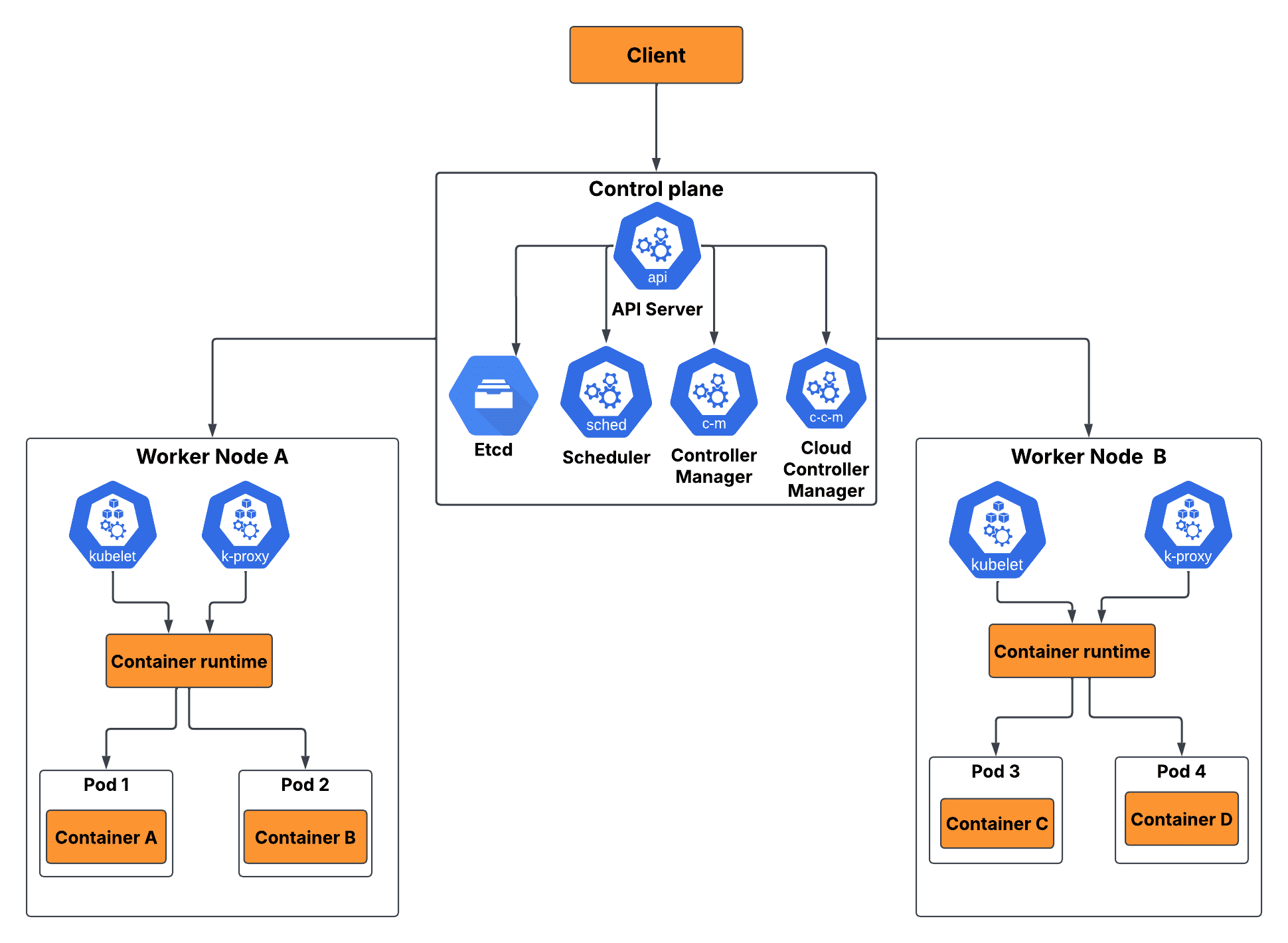
The Control Plane (Master Node/Component)
Makes global scheduling decisions, detects cluster events, and drives the cluster toward its desired state.
- kube-apiserver
- Frontend for the Kubernetes control plane.
- Exposes the Kubernetes API and intercepts all configuration and management traffic.
- etcd
- A highly available, distributed key-value store used as Kubernetes’ backing store for all cluster state data.
- !! If etcd is lost without a backup, the entire cluster state is unrecoverable.
- kube-scheduler
- Watches for newly created Pods with no assigned node and selects an appropriate healthy worker node based on resource constraints and affinity rules.
- kube-controller-manager
- Runs controller processes that continuously reconcile the actual cluster state toward the desired state (e.g., Node Controller, ReplicaSet Controller, Job Controller).
The Data Plane (Worker Nodes)
Machines (VMs or physical servers) that host the containers making up the user application.
- kubelet
- An agent that runs on each node.
- Ensures containers described in PodSpecs are running and healthy; reports node status back to the Control Plane.
- kube-proxy
- A network proxy running on each node that maintains network rules to allow communication to Pods from inside or outside the cluster.
- Container Runtime
- Software responsible for running containers (GKE uses
containerd).
- Software responsible for running containers (GKE uses
Core Kubernetes Objects
Defined as declarative YAML manifests that describe the desired state of application components.
- Pod
- Smallest deployable computing unit in Kubernetes.
- Represents a single instance of a running process and can contain one or more tightly coupled containers sharing storage and network resources.
- Pods are ephemeral
- When they die they are replaced, not restarted in place. Do not store persistent state in a Pod.
- Resource
- An endpoint in Kubernetes API that stores a collection of API objects of a certain kind.
- e.g. built-in pods resource contains a collection of Pod objects.
- An endpoint in Kubernetes API that stores a collection of API objects of a certain kind.
- Deployment
- A declarative object that manages a replicated, stateless application.
- Automates the lifecycle of Pods, ensuring a defined number of replicas are always running and handling rolling updates and rollbacks.
- StatefulSet
- Manages stateful workloads where each Pod requires a stable network identity and persistent volume that follows it even after rescheduling (e.g., databases, distributed caches).
- !! Use StatefulSets for databases (e.g., running Kafka or Cassandra on GKE). Use Deployments for stateless services.
- DaemonSet
- Ensures a copy of a specific Pod runs on every node in the cluster (or a selected subset).
- Common use case: deploying cluster-wide logging agents (Fluentd, Ops Agent) or monitoring exporters.
- Job / CronJob
- Job: Runs a Pod to completion once (e.g., a database migration script).
- CronJob: Runs a Job on a scheduled basis (e.g., nightly data export).
- ConfigMap & Secret
- ConfigMap: Injects non-sensitive configuration data (environment variables, config files) into Pods without baking it into the container image.
- Secret: Injects sensitive data (passwords, API keys, TLS certificates) as base64-encoded values. !! Secrets are base64-encoded, not encrypted by default. Use CMEK encryption for etcd to truly protect them at rest.
- Service
- Abstraction providing a stable IP address and DNS name to route traffic to a set of matching Pods (selected via labels).
- Pods are ephemeral with changing IPs. Services provide the stable frontend.
- Ingress
- An API object acting as an external Layer 7 routing controller for HTTP/S traffic.
- Provides path-based and host-based routing rules (e.g.,
example.com/api→ Service A,example.com/web→ Service B) and SSL/TLS termination. - !! On GKE, creating an Ingress object automatically provisions a GCP External Application Load Balancer.
| Service Type | Accessibility | Use Case |
|---|---|---|
| ClusterIP (default) | Cluster-internal only | Internal microservice-to-microservice communication |
| NodePort | External via node IP + static port | Development/testing; rarely used in production |
| LoadBalancer | External via Cloud Load Balancer | Provisioned directly from GCP; maps to a GC Network LB |
| ExternalName | DNS alias to external service | Routing to external APIs via a cluster-internal name |
Key Concepts
- Declarative Management
- You define what the end state should look like; Kubernetes runs a continuous reconciliation loop to drive the actual cluster state toward the desired state.
- Namespace
- A virtual cluster inside a physical cluster, used to isolate resources and apply RBAC policies per team or environment.
- Namespaces do not provide network isolation by default.
- Use NetworkPolicy objects for that.
- Labels & Selectors
- Labels are key-value metadata on any Kubernetes object. Selectors filter objects by their labels. This is how Services find their target Pods and how HPA targets its Deployment.
- Resource Requests & Limits
requests: The minimum CPU/memory guaranteed to a container (used by the scheduler to find a suitable node).limits: The maximum CPU/memory a container can consume before being throttled (CPU) or OOM-killed (memory).- !! Always set both requests and limits. Without requests, the scheduler can over-pack nodes. Without limits, a single noisy Pod can starve all others on the node.
- Stateless vs. Stateful
- Stateless workloads (Deployments) can be destroyed and recreated instantly on any node without data loss.
- Stateful workloads (StatefulSets) require unique identities and persistent attachments to specific storage volumes across rescheduling events.
Kubernetes Custom Resource (CR)
An extension of the Kubernetes API that allows you to store and manage your own structured data as a native object. While Kubernetes comes pre-packaged with built-in resources like Pods and Deployments, you use Custom Resources to introduce domain-specific configurations (such as a Database, Backup, or SSLWithCertificate) directly into your cluster.
- Custom Resource Definition (CRD)
- The blueprint or database schema.
- Registers your new object type and specifies data types and validation rules using OpenAPI v3.
- Custom Resource (CR)
- The actual instance of data created from that blueprint.
- Defined via a standard YAML file.
- Custom Controller
- Background process or code.
- On it’s on, a custom resource only stores data.
- The controller actively runs a “reconciliation loop” to make the cluster match the desired state.
- When a CRD and a Custom Controller are packaged together to automate the lifecycle of an application, it is known as the Operator Pattern
Key Use
- Declarative Control:
- You define the target outcome, and let automation achieve it.
- Familiar Tooling:
- Teams use existing RBAC, namespaces, and
kubectlconfigurations.
- Teams use existing RBAC, namespaces, and
- Native Ecosystem Integration:
- Popular third-party cloud-native tools (like cert-manager, ArgoCD, and Prometheus) rely entirely on CRDs to function within clusters
Google Kubernetes Engine (GKE) Ecosystem
Google’s flagship Kubernetes platform for designing containerized solutions on GCP.
VPC-Native Clusters
CIDR (Classless Inter Domain Routing)
A method for allocating IP addresses and routing internal traffic.
- Written as an IP address followed by a slash and a number (e.g.,
192.168.1.0/24).- The IP Address
- Identifies the starting address or network prefix.
- The Slash Number (Prefix Length)
- Indicates how many bits are used for the network identity. The remaining bits are used for individual hosts (devices)
- The IP Address
Alias IP Ranges (internal CIDR ranges)
A VPC-native cluster leverages alias IP ranges so that each VM or Pod network interface can carry multiple IP addresses. This design allows Pods to have their own unique internal IP, simplifying network policies and firewall configurations.
In a legacy routes-based cluster, Pods are allocated IP addresses from an arbitrary, isolated network range completely separate from the VPC. The VPC has no idea where these Pod IPs exist until GKE forces custom static routing rules into the VPC router for every single node.
In a VPC-native cluster, Pod IP addresses are first-class citizens of your VPC. When you create a VPC-native cluster, you map it to a subnet that uses Secondary CIDR blocks:
- Primary Range / Node IP Range
- Dedicated to the Nodes (the Compute Engine VMs themselves) and Internal Load Balancers.
- Taken from the primary IPv4 range of the VPC subnet.
- Typically
/20or/24, depending on how many total nodes you plan to scale.
- Secondary Range A / Pod IP Range (Cluster CIDR)
- Dedicated entirely to assign unique internal IP addresses to every Pod running in the cluster.
- A secondary IP range within the subnet.
- Defaults to
/14(262,144 IPs) if unspecified. You can add more secondary Pod ranges later if you run out of IPs.
- Secondary Range B / Service IP Range (ClusterIP Range)
- Dedicated to assign internal virtual IPs to Kubernetes Services (ClusterIPs).
- A secondary IP range within the subnet.
- GKE defaults to a Google-managed range of
34.118.224.0/20(4,096 IPs) for Autopilot (v1.27+) and Standard (v1.29+) clusters. This range is non-routable outside the cluster, meaning you can reuse it across multiple clusters without consuming your own VPC address space.
When a node boots up, GKE automatically allocates a chunk of that secondary IP range (typically a /24 block) as an Alias IP directly onto the node’s network interface card (vNIC). Because the VPC is inherently aware of these ranges, traffic routes automatically without custom routing tables.
Choosing the right sizing is critical because these IP ranges (except for Pod ranges in newer versions) cannot be changed after the cluster is created
| Architectural Capability | VPC-Native Clusters (Modern Best Practice) | Routes-Based Clusters (Legacy) |
|---|---|---|
| Routing Mechanism | Uses Subnet Secondary IP Ranges (Alias IPs). | Uses Custom Static Routes per Node. |
| VPC Scaling Limit | Scalable to thousands of nodes. Safe from VPC route table quotas. | Limited by the VPC’s custom static route quota (usually maxes out cluster size). |
| VPC Peering & Shared VPC | Fully supported natively. Pod IPs route seamlessly across peered VPCs. | Highly complex. Requires manual routing export/import overrides; breaks easily. |
| Hybrid Connectivity | Natively routable. Cloud Router automatically advertises Pod secondary ranges over VPN/Interconnect. | Not natively supported. Requires complex NAT proxies or manual custom route advertisements. |
| Network Visibility | Pod IPs are visible in VPC Flow Logs and Network Intelligence Center. | Traffic looks like it originates only from Node IPs; loses container-level visibility. |
| Load Balancing Efficiency | Supports Container-Native Load Balancing via Network Endpoint Groups (NEGs). | Uses kube-proxy iptables routing (adds an extra network hop at the node level). |
GKE Jumphost (Bastion Host)
A secure, heavily monitored proxy or VM used to safely access a private GKE cluster.
- Private clusters lack public endpoints, the jumphost acts as a secure gateway to run
kubectlcommands and manage workloads. - Provision Jumphost
- Create standard GCE VM instance in same VPC network as private GKE cluster.
- Do not assign public IP address to VM for max security.
- Connect to it using IAP, which eliminates need for public IP or exposed SSH firewall rules.
- Configure Firewall Rules
- To ensure traffic can flow securely between jumphost and GKE control plane.
- Update GKE private cluster’s Master Authorized Networks to include internal IP CIDR range of subnet where jumphost resides.
- Create ingress rule allowing traffic on port 443/8443 (for Kubernetes API) from jumphost’s IP/subnet to GKE control plane.
- Connect via IAP and Establish a Tunnel
- Establish an SSH tunnel through jumphost instead of trying to reach GKE cluster directly from local machine.
- Configure
kubectl& Authenticate- Once tunnel is active, configure local
kubectlcontext to route through jumphost using proxy or direct forwarding.
- Once tunnel is active, configure local
GKE Autopilot vs. GKE Standard
| Feature | GKE Autopilot | GKE Standard |
|---|---|---|
| Management Model | Pod-centric; Google manages all nodes | Node-centric; user manages node pools |
| Billing Model | Pay for Pod CPU/memory/storage requested | Pay for underlying Compute Engine VMs (idle capacity included) |
| Node Configuration | Fully automated by Google | Full user control (OS, SSH, instance types) |
| Privileged Containers | Not permitted | Permitted |
| Custom Kernel/OS | Not permitted | Permitted |
| Best For | Most production workloads (default choice) | Specialized workloads requiring kernel/hardware access |
- GKE Autopilot (recommended default)
- Fully managed, declarative, and pod-centric.
- Google provisions, manages, configures, and auto-scales the underlying node infrastructure.
- Pay strictly for CPU, memory, and storage requested by running Pods (no charge for idle node capacity).
- Prevents destructive cluster mutations (no
privilegedroot containers, no custom SSH node access, no kernel tweaks).
- GKE Standard
- Imperative, node-centric cluster topology.
- User responsible for sizing, managing, updating, and maintaining the underlying Compute Engine VM instances making up node pools.
- Pay for underlying Compute Engine instances regardless of Pod utilization.
- Use only when workloads explicitly require: privileged DaemonSets, kernel-level adjustments, non-standard networking interfaces, or custom GPU hardware configuration.
GKE Network Policies vs. VPC Firewall Rules
- VPC Firewall rules cannot inspect traffic inside a node between Pods sharing the same VM host.
- To restrict Pod-to-Pod communication within a cluster, you must apply Kubernetes NetworkPolicies.
GKE Autoscaling Mechanics
Three independent autoscaling mechanisms operate at different layers of the stack.
- Horizontal Pod Autoscaler (HPA)
- Adjusts the number of Pod replicas in a Deployment or StatefulSet based on observed metrics.
- Default metric: average CPU utilization (e.g., scale out when average Pod CPU exceeds 80%).
- Can also scale on custom metrics (e.g., Pub/Sub queue depth, application-level requests/second via Cloud Monitoring).
- Vertical Pod Autoscaler (VPA)
- Adjusts the CPU and memory resource requests/limits of existing Pods when they are consistently under or over provisioned.
- Prevents OOM (Out of Memory) crashes caused by under-allocated limits.
- !! VPA and HPA cannot be run concurrently on the same CPU/memory metrics. Doing so creates conflicting signals. The safe exception: run HPA on custom or external metrics (e.g., Pub/Sub queue depth) while VPA manages CPU/memory sizing.
- Cluster Autoscaler
- Operates at the node pool level
- Adds or removes entire Compute Engine VM nodes.
- Triggers when Pods are stuck in
Pendingstate because no existing node has sufficient capacity. - Also scales down by safely evicting Pods from underutilized nodes and terminating those VMs.
- !! Cluster Autoscaler only scales nodes; HPA/VPA scale workloads. All three can run simultaneously.
- Operates at the node pool level
Node Auto-Provisioning (NAP)
- An extension of the Cluster Autoscaler that can automatically create new node pools (not just add nodes to existing pools) with the right machine type for pending Pod requirements.
- Particularly useful in GKE Autopilot, where node pool management is fully abstracted.
GKE Workload Identity
The recommended method for allowing GKE workloads (Pods) to authenticate to GCP APIs without service account key files.
- Binds a Kubernetes Service Account (KSA) to a GCP Service Account (GSA), so Pods automatically receive a short-lived GCP access token.
- !! Never mount service account JSON key files as Kubernetes Secrets. Use Workload Identity instead.
- How it works:
- Annotate the Kubernetes Service Account with the GSA email.
- Grant the GSA the
roles/iam.workloadIdentityUserrole, scoped to the KSA. - Pods using that KSA automatically receive GCP credentials via the metadata server, no key files involved.
Private Clusters
A GKE cluster where worker nodes have no public IP addresses, making them unreachable directly from the internet.
- The control plane also gets a private endpoint (accessible only from within the authorized VPC).
- Nodes can still pull container images and reach GCP APIs via Private Google Access.
- Access to the private control plane from developer workstations is typically provided via:
- Authorized Networks: Allowlist specific CIDR ranges.
- Cloud Shell or a bastion host (jump server) inside the same VPC.
- IAP TCP Tunnelling for SSH access to nodes without exposing them to the internet.
- !! Private Clusters are the production standard for security-sensitive GKE deployments. Public clusters are suitable only for prototyping.
Multi-Cluster Management & GKE Fleets
Managing clusters deployed across environments (dev/prod) or geographic boundaries becomes an operational bottleneck at scale.
- GKE Fleets (formerly Hub)
- A logical grouping of multiple Kubernetes clusters (across Google Cloud regions, multi-cloud AWS/Azure, or on-premises) that can be governed collectively from a single control surface.
- Sameness Assumption
- Fleets enforce the concept of namespace sameness: the namespace
frontendacross 5 different clusters in a fleet is treated as the same logical boundary for policy enforcement.
- Fleets enforce the concept of namespace sameness: the namespace
- Multi-Cluster Ingress & Cloud Service Mesh
- Globally load balances traffic across physical cluster boundaries, automatically routing users to the nearest responsive cluster deployment.
- Config Sync & Policy Controller
- Automatically pushes GitOps config and compliance rules (e.g., “all clusters in this fleet must block public IPs”) uniformly to all member clusters.
- Eliminates config drift between clusters.
- Git repository is the single source of truth.
Google Cloud Managed Service for Prometheus (GMP)
Prometheus
The de facto standard open-source monitoring and alerting toolkit for Kubernetes. Built natively for cloud-native environments, it utilizes Kubernetes’ built-in service discovery to automatically scrape metrics from dynamic pods and nodes as they scale, eliminating manual configuration tracking.
- Pull-Based Model
- Prometheus actively scrapes (pulls) metrics from HTTP endpoints (usually
/metrics) exposed by your applications and cluster components.
- Prometheus actively scrapes (pulls) metrics from HTTP endpoints (usually
- Kubernetes Service Discovery
- It integrates directly with the Kubernetes API to dynamically find and monitor new and destroyed services without needing reconfiguration.
- PromQL
- A purpose-built query language that allows real-time aggregation and filtering of multi-label time-series data.
- Alertmanager
- The companion component that de-duplicates, groups, and routes alerts to channels like PagerDuty or Slack
Prometheus Metrics
A highly structured, text-based format for time-series data (data points tracked over time).
Structure
http_requests_total{method="POST", handler="/login", status="200"} 1043- Metric Name (
http_requests_total): What is being measured. - Labels (
method,handler,status): Dimensions that allow you to slice and dice your data. Instead of creating different metrics for every status code (e.g.,http_200_requests,http_404_requests), you use labels to filter a single metric. - Value (
1043): The current measurement (usually a float64).
Metric Types
- Counter: A value that only goes up (or resets to 0 if a process restarts), like
system_cpu_time_seconds_totalorhttp_requests_total. To find out how many requests happened per second, you use a rate function over time. - Gauge: A value that can go up and down, representing a snapshot in time. Examples include
node_memory_Active_bytesorkubernetes_running_pods. - Histogram: Measures the statistical distribution of durations or sizes (e.g., HTTP request latencies) and counts them in configurable “buckets.”
- Summary: Similar to a histogram, but it calculates configurable percentiles (e.g., p95, p99 latency) directly over a sliding time window.